Ultimate Teacher Planner Canva Template for Organized Educators
Every teacher knows the feeling of juggling lesson plans, attendance records, parent communication, and grading all at once. It can quickly become overwhelming without a solid system in place. The Ultimate Teacher Planner Canva Template offers a practical solution that puts everything you need in one customizable, easy-to-use format. Whether you are a classroom veteran or just starting your teaching journey, this planner helps you stay on top of your responsibilities without the stress of piecing together multiple tools. Designed specifically for educators, it brings structure to your daily routine and gives you back valuable time and mental energy.
What Makes This Planner Different
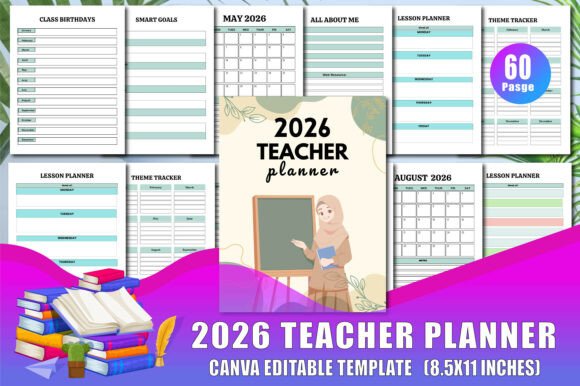
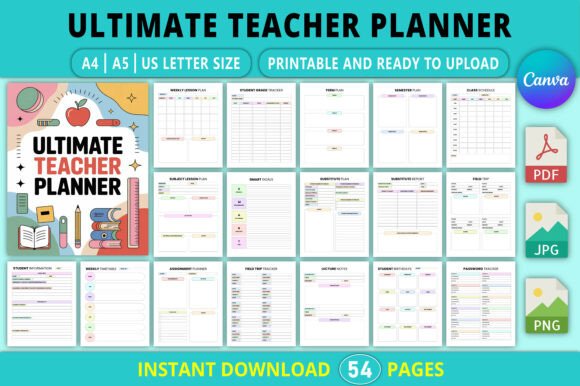
Instead of a generic planner that forces you to adapt your workflow, this template is built around the real needs of teachers. It includes dedicated pages for student information, class schedules, lesson plans, attendance, homework tracking, grade recording, and even substitute teacher reports. The beauty lies in its flexibility. Because it is fully editable in Canva, you can change fonts, colors, and layouts to match your personal style or school branding. You are not locked into a rigid design. You can add pages, remove sections, or rearrange everything until it feels right for your specific teaching context.
The template comes in three popular print sizes: A4, A5, and US Letter. This means you can print it at home, take it to a local print shop, or upload it to a print-on-demand service like Amazon KDP. Teachers who sell planners or educational materials will find this especially useful for creating products that appeal to a wide audience.
Who Benefits from This Template
This planner is designed for a broad range of educators and learning support roles. Classroom teachers in public or private schools can use it to manage multiple subjects and grade levels. Tutors who work with students one-on-one will appreciate the student information and progress tracking sections. Homeschooling parents often find that having a single planner for lesson planning, attendance, and goal setting simplifies their entire teaching approach. Even substitute teachers can benefit from the substitute plan and report pages, which make stepping into a new classroom much less daunting.
Beyond individual use, this template works well for small business owners who create and sell educational planners on Etsy, Amazon KDP, or their own websites. The editable nature of the Canva template means you can customize it for different niches or add your own branding before selling it as a digital product or printed planner.
Key Sections and How to Use Them
Let us walk through the main components of the planner so you can see exactly how each section supports your teaching workflow.
Student and Contact Information
The Student Information page lets you record names, parent or guardian contacts, medical notes, and other important details. A separate Students Contact page and Teacher Contact page make it easy to keep phone numbers and email addresses accessible. Having all this information in one place saves you from flipping through multiple files or searching your inbox during a busy day.
Scheduling Pages
The planner includes a Class Schedule, Daily Schedule, and Weekly Timetable so you can map out your teaching hours, breaks, and special events. The Daily Planner, Weekly Planner, Monthly Planner, and Yearly Planner give you different timeframes for planning lessons, assignments, and personal tasks. Many teachers use the monthly view for long-term curriculum planning and the weekly or daily pages for detailed lesson execution.
Lesson Planning Tools
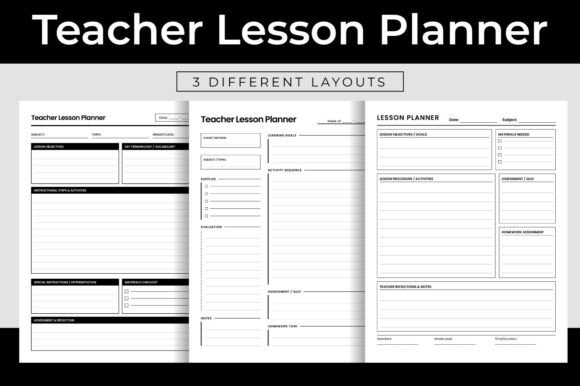
There are multiple lesson plan pages including a standard Lesson Plan, Weekly Lesson Plan, and Subject Lesson Plan. This variety allows you to choose the format that matches your teaching style. For example, a music teacher might prefer the subject-specific layout, while an elementary teacher covering all subjects may find the weekly lesson plan more practical. Each page includes space for objectives, materials, activities, and notes.
Tracking and Records
The Attendance Record, Homework Tracker, Assignment Planner, and Assignment Tracker pages help you monitor student participation and progress. The Student Grade Tracker is especially valuable for calculating final marks or identifying students who need extra support. For term-based planning, the Term Plan and Term Review pages let you set goals and reflect on outcomes. Similarly, the Semester Plan and Semester Review provide a bigger picture view of your teaching year.
Substitute Teacher and Log Pages
When you are away, a Substitute Plan and Substitute Report pages ensure that your class runs smoothly. The Tardy Log and Absence Log help you track patterns and communicate with parents if needed. A Seating Chart is also included, which can be a lifesaver for classroom management, especially at the beginning of the school year.
Professional Growth and Reflection
The Smart Goals page encourages you to set specific, measurable, achievable, relevant, and time-bound goals for yourself and your students. The Professional Learning section lets you document workshops, courses, or conferences you attend. The Year Review and Helpful Hints pages provide space for reflection, so you can celebrate successes and note areas for improvement.
Practical Use Cases for Beginners and Experienced Users
If you are new to using digital planners, the Canva interface is beginner-friendly. You can start by choosing a print size that matches your needs. Many teachers begin with the US Letter size because it fits easily into a standard binder. Open the template in Canva, and you will see all the pages laid out. From there, you can change the text to include your name, school year, and class details. Adjust the colors to match your classroom theme or personal preference. If you are a tutor who works with only a few students, you can delete the extra pages you do not need. If you are a high school teacher with five classes, you can duplicate pages like the attendance log and grade tracker to cover each group.
For creators and small business owners, this template is a ready-made product you can customize and sell. You might change the cover design, add your own branding, or bundle it with other educational resources. The KDP interior format is already optimized for printing, so you can upload it directly to Amazon without worrying about margins or bleed settings. Many sellers use this template as a starting point and then create variations for different grade levels or subjects.
Important Considerations Before You Start
Before diving in, there are a few things to keep in mind to get the most out of this planner. First, since it is a Canva template, you will need a free or paid Canva account to edit it. The free account gives you plenty of options, but some premium fonts or elements may require a Canva Pro subscription. If you plan to sell the planner, be sure to check the licensing terms for any images or fonts you use, especially if you modify the original design.
Think about how you prefer to work. Do you like having a physical planner you can write in by hand? Then print the pages and bind them or place them in a ring binder. Do you prefer digital planning? You can use the template in Canva or export it as a PDF and use it with apps like GoodNotes or Notability on a tablet. Some teachers even use a hybrid approach, printing certain pages like the daily planner and keeping digital versions of the larger sections.
Consider how often you will update the planner. Some pages like the yearly planner and class schedule only need to be filled in once per term or semester. Others like the daily planner and attendance record require regular attention. Setting aside a few minutes each day or week to update your planner will help you maintain consistency and avoid falling behind.
If you are selling this product, think about your audience. A planner for elementary teachers might need more student information pages and behavior tracking sections. A planner for high school teachers might focus more on grade tracking and assignment management. You can adapt this template to fit those specific needs by adding or removing pages before publishing.
Final Thoughts on Staying Organized
Teaching is a demanding profession that requires balance between structure and flexibility. The Ultimate Teacher Planner Editable Canva Template KDP Interior gives you a foundation to build your own organizational system without starting from scratch. It covers the essential areas that every educator deals with, from daily scheduling to long-term goal setting. Whether you use it for yourself or as a product to sell, the ability to customize every detail makes it a versatile tool that grows with you.
Start by exploring the pages and identifying which ones will be most useful for your current situation. Customize the colors and fonts to make it feel like your own. Print a few pages to test the layout before committing to a full print run. Over time, you will develop a rhythm that keeps you organized, productive, and far less stressed throughout the school year.