My Pregnancy Journal Canva Template for Keepsake Design
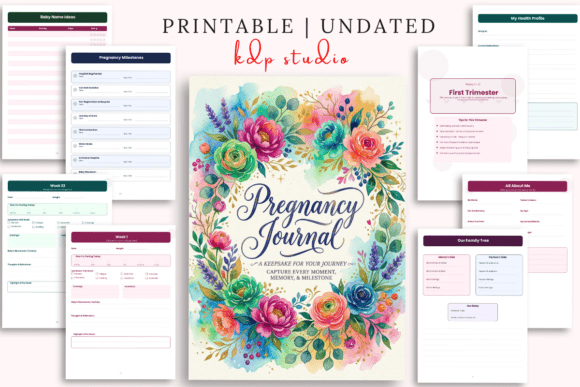
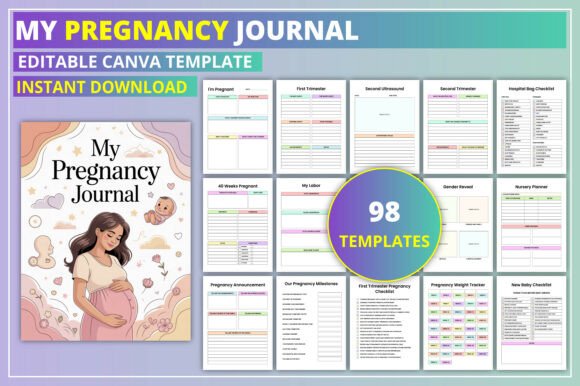
When you're building a product for expecting mothers, the design needs to feel personal, warm, and thoughtfully organized. The My Pregnancy Journal Canva Template delivers exactly that—a complete, editable pregnancy memory book that works both as a printable KDP interior and a customizable digital planner. Whether you're a publisher creating Amazon listings, a designer building client templates, or a small business owner selling planner products, this template gives you a solid foundation to work from without starting from scratch.
What stands out immediately is how the template balances structure with flexibility. It includes 40+ pages covering everything from pregnancy announcement and week-by-week tracking to budget planning, medical appointments, baby name lists, and daily food diaries. The design leans clean and modern, with ample white space and a gentle, inviting layout that doesn't feel clinical. Soft color palettes, rounded section dividers, and thoughtful icon accents give it a warm, approachable personality—exactly what a pregnancy journal should feel like.
Visual Character and Design Appeal
The visual style of this template sits somewhere between a premium scrapbook and a polished digital planner. It uses a mix of serif and sans serif typography for headings and body text, creating clear hierarchy without feeling stiff. The handwritten-style elements and subtle decorative touches add a personal, handmade quality that resonates with expecting mothers looking for something sentimental but not overly cutesy.
From a brand identity perspective, the template communicates care, reliability, and warmth. The layout grids are consistent, which makes the journal feel professional and print-ready, while the color schemes and font choices keep it approachable for a personal audience. If you're designing for a planner shop or a baby memory keepsake line, this template aligns well with the modern mom aesthetic—functional but emotional, clean but not cold.
The editable Canva link is a major advantage here. You can swap out colors, fonts, images, and backgrounds to match a specific brand palette or client preference. This flexibility makes the template suitable for multiple use cases, from a minimalist black-and-white version to something more pastel and floral. As a design asset, it's versatile enough to rebrand quickly without reworking the entire layout.
Practical Applications Across Projects
For publishers and content creators, this template works well as a KDP interior ready for Amazon upload. The included JPG, PNG, and high-quality PDF files mean you can list it directly or make minor tweaks before publishing. The 40-week pregnancy tracker and weight log pages are particularly strong for Amazon listings because they offer clear, functional value that buyers can see immediately in the preview.
For designers and brand strategists, the template functions as a base for client projects. You can customize it for a doula's client gift, a maternity photography package add-on, or a boutique baby shop's promotional item. The medical appointments tracker, medication log, and prenatal vitamin tracker give it a practical edge that goes beyond just memory keeping—it genuinely helps mothers stay organized during pregnancy.
Small business owners in the planner niche will appreciate the product's modular structure. You can pull individual pages—like the baby budget sheet, the meal planner, or the sleep tracker—and repurpose them as standalone printables or digital downloads. The grocery list and recipe card pages also extend the template's usefulness beyond pregnancy itself, making it a long-term resource for new parents.
For personal use, the template serves as a complete pregnancy keepsake. The pregnancy reflection pages and labor section provide space for emotional storytelling, while the habits tracker and mood tracker add a wellness dimension. It's the kind of journal that becomes a treasured family artifact, not just a planner that gets tossed after nine months.
Readability, Visual Hierarchy, and User Experience
One of the stronger design decisions in this template is the consistent visual hierarchy. Headings are clearly distinguished from body copy using size and weight contrast, which makes navigation intuitive. The week-by-week section, for example, uses bold date headers with supporting lines underneath, so you can quickly find your current week without scanning dense text.
The use of serif fonts for titles adds a touch of elegance and tradition, while sans serif fonts for body text improve readability, especially in print. This pairing is a smart choice for a journal that will be read both on screen and in physical form. The line spacing and margin widths are generous enough to avoid a cramped look, even when filled with handwritten notes.
For a pregnancy journal, emotional engagement matters as much as functionality. The template's layout encourages reflection without feeling overwhelming. Pages like "Pregnancy Reflection" and "Baby Names Ideas" have ample writing space and gentle prompts, which help users engage without needing design skills. This thoughtful approach to user experience is what separates a good template from a great one.
If you're evaluating the template for commercial use, the editable Canva link is worth highlighting. You can adjust font pairings to match your brand guidelines, change accent colors to suit seasonal collections, or swap in custom illustrations for a more personalized product. This flexibility supports consistent brand identity across multiple journal editions without requiring advanced design software.
Practical Guidance for Choosing and Using This Template
Before purchasing, consider how the template fits your specific project goals. If you're publishing on Amazon KDP, check that the page count and trim size align with your printing requirements. The template's clean layout works well for 6x9 inch or 8.5x11 inch formats, but you can adjust dimensions in Canva if needed.
For designers creating a branded product line, think about how this template complements your existing offerings. If you already sell baby shower planners or postpartum journals, this pregnancy journal fills a natural gap. The consistent design language across your product suite builds recognition and trust with your audience.
When testing font pairings in Canva, start with the template's default serif and sans serif combination. If you want a more modern feel, try a clean geometric sans serif for headings paired with a readable humanist serif for body text. For a softer, more maternal tone, a rounded sans serif with a gentle cursive script for accent words can work beautifully. Just keep readability as your priority—especially for the weekly trackers and medical logs where clarity is essential.
The commercial licensing included with this template covers most publishing and resale scenarios, but always double-check the specific terms. If you plan to sell the journal as a printed book or digital download, confirm that your license allows for that use case. Most Canva template licenses permit commercial use with modification, but verifying protects your business in the long run.
For content creators building a brand around pregnancy and parenting resources, this template can be a cornerstone product. Pair it with matching social media graphics, a coordinating baby shower invitation set, or a postpartum recovery planner to create a cohesive brand experience. The more your products visually relate to each other, the stronger your brand identity becomes in the minds of your customers.
Practical Recommendations for Maximum Impact
If you're using this template for a client project, walk through each page with them before making edits. The template includes pages some clients may not need—like the workout tracker or period tracker—and others they may want to expand, like the weekly pregnancy log. Canva makes it easy to duplicate or remove pages, so tailor the journal to the client's specific journey.
For Amazon listings, focus your product preview on the most visually appealing and unique pages. The pregnancy announcement page, the weekly tracker spread, and the baby names ideas page tend to resonate well with buyers. Use the editable feature to add a sample name and due date to your preview images, which helps customers visualize using the journal themselves.
Consider adding a personalized cover page with the mother's name or due date for a premium offering. This customization turns a standard template into a meaningful gift, which can justify a higher price point. The Canva editability makes this personalization quick and doesn't require advanced design skills.
Finally, think about the long-term value of this template in your product library. Pregnancy journals have a steady, recurring audience, and a well-designed template like this one can generate passive income for years. Keep your Canva link updated with any design improvements or new page additions to maintain relevance and customer satisfaction.
The My Pregnancy Journal Canva Template is more than just a set of pages—it's a practical tool for capturing a profound life transition. Whether you're publishing, designing, or creating for personal use, its thoughtful structure and flexible design make it a reliable asset that serves both the parent and the professional behind the product.