The 2027 Working from Home Planner: A Practical Guide to Getting It Right
Working from home offers incredible flexibility, but it also demands a level of self-management that traditional office jobs rarely require. Without a solid structure, it’s easy to let work hours bleed into personal time, miss important deadlines, or lose track of long-term goals. A dedicated planner can be the anchor you need, and the 2027 Working from Home Planner is designed specifically for this lifestyle. Whether you are a freelancer, a small business owner, a blogger, or a remote employee, having a central hub for your tasks, finances, and ideas is essential. However, simply purchasing or downloading a planner isn’t a magic solution. The real value comes from using it effectively and avoiding common mistakes that can turn a promising tool into an expensive notebook.
Mistake 1: Treating Your Planner Like a Static Notebook
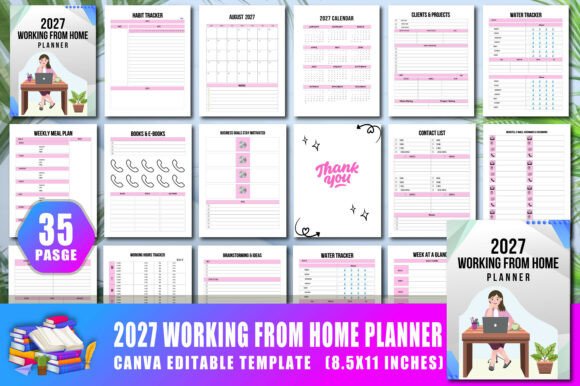
One of the most common oversights is using only the daily task sections while ignoring the specialized trackers. The 2027 Working from Home Planner includes pages like the Working Hours Tracker, Habit Tracker, and Water Tracker. Many people skip these because they seem like extras, but this is where the real behavior change happens.
When you don’t track your working hours, it’s easy to underestimate how much time you spend on specific clients or projects. This leads to burnout or undercharging for your services. Without a habit tracker, you might struggle to maintain the routines that keep you productive, such as regular breaks or exercise. The better approach is to use these trackers as your accountability system. Spend two minutes at the end of each day filling them in. Over time, this data gives you a clear picture of your productivity patterns, helping you make informed decisions about your schedule and workload.
Mistake 2: Overlooking the Financial and Administrative Pages
A major source of stress for anyone working from home is managing irregular income and expenses. The planner includes a Monthly Finances At A Glance page and a dedicated section for Websites, E-Mails, Usernames, and Passwords. A common mistake is to neglect these pages until tax season or until you’ve forgotten a login credential for an important client portal.
This reactive approach creates unnecessary urgency and errors. Instead, use the finances page to record income and expenses weekly. It takes just a few minutes and saves you from hours of digging through bank statements later. Similarly, use the password tracker as a secure, physical backup for your digital password manager. Keeping this information organized from January means you start the year with a clean administrative slate, rather than playing catch-up in December.
Mistake 3: Not Taking Advantage of the Canva Customization
One of the standout features of this product is that it comes with an editable Canva link. A frequent mistake is either using the design exactly as is without personalizing it, or spending hours trying to redesign everything from scratch. The goal of customization should be to optimize the layout for your specific workflow.
For example, if you are a blogger or content creator, you might want to duplicate the Blog Post Planner pages and remove some pages that don’t apply to you, like the Inventory tracker. You can change the color scheme to match your brand or mood for the year. The key is to make small, intentional adjustments. Don’t overthink it. Change the fonts, adjust the size of a text box, or add a sticky notes section that works for your brain. The flexibility of Canva means you get a professional layout without the rigidity of a pre-printed book.
Mistake 4: Focusing Only on Aesthetics Over Function
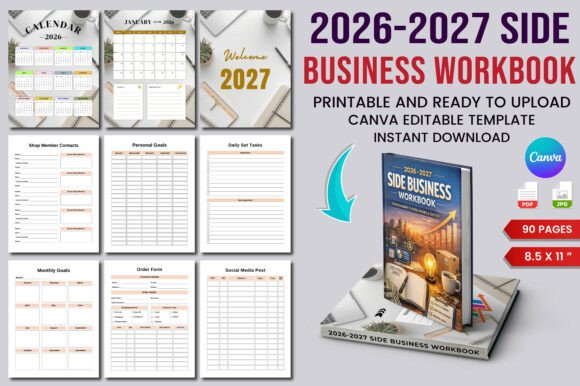
It is easy to get drawn into beautiful designs, but a planner’s primary job is to make your life easier. Some planners try to be everything to everyone but lack depth in critical areas. The 2027 Working from Home Planner includes 35 specific pages that cover the full spectrum of remote work needs. A mistake would be to ignore the pages that seem less glamorous, such as the Brainstorming Ideas page or the Clients Projects tracker.
These pages are not filler. The brainstorming section gives you a dedicated space to separate creative thinking from task management. The clients project page allows you to keep track of deliverables, deadlines, and communication history in one place. Before you start using the planner, flip through every section. Understand the logic behind the layout. When you use each page for its intended purpose, you create a system where nothing falls through the cracks.
Mistake 5: Misunderstanding the Technical Requirements for Printing
If you plan to upload this planner to Amazon KDP or print it at home, technical details matter more than you might think. The product is No Bleed and set at 300 DPI. A common pitfall is ignoring these specifications and trying to resize or alter the file without understanding how it affects print quality.
Printing a "No Bleed" file on a printer that expects bleed can cut off important elements like the edge of a table or text. Conversely, trying to add bleed incorrectly can distort the layout. The best approach is to trust the provided format. If you are using the Canva link to edit, ensure you don’t drag critical text or trackers too close to the edge of the page. Keep your content within the safe margins. This ensures that when you download your high-resolution JPG or PNG files, they will print exactly as intended, without any cut-off content or awkward margins.
Mistake 6: Neglecting the Setup and Consistent Use
Perhaps the biggest mistake people make with any planner is buying it, filling in the first few days, and then abandoning it by March. The 2027 Working from Home Planner is a tool, and like any tool, its effectiveness depends on consistent use. A lack of routine leads to chaos, missed appointments, and forgotten goals.
To avoid this, schedule a daily and weekly planning session. Every morning, spend five minutes reviewing your To-Do List for the day. Every Sunday evening, look at your Week At A Glance and your Weekly Meal Plan. This small investment of time pays off in reduced anxiety and increased productivity. Use the Belongs To page to make it feel like yours. Treat this planner as your central command center. When you build the habit of consulting it and updating it, you will naturally stay organized without needing to force it.
How to Get the Most Out of Your 2027 Planner
Start by filling out the 2027 Calendar and Name of Holiday pages so you have a bird’s-eye view of the entire year. Then, move to the Business Goals Stay Motivated page. This is your north star. Every task you write down for the rest of the year should connect back to this page in some way.
Use the Books E-Books and Contact List pages as a professional development log. Track the resources you consume and the people you network with. The Notes and Thank You pages add a personal touch, reminding you that work is not just about tasks, but about relationships and gratitude. By mixing professional tracking with personal touches, you create a planner that supports the whole person, not just the employee.
The 2027 Working from Home Planner gives you a complete framework for managing your remote work life. Whether you choose to print it, upload it to KDP, or use it digitally, the structure is there to help you succeed. By avoiding these common mistakes—neglecting specialized trackers, ignoring financial pages, failing to customize, overlooking print specs, and inconsistent use—you set yourself up for a productive, balanced, and organized year. Take the time to set it up properly now, and you will thank yourself every single day in 2027.