Editable 2026-2027 Essentials Planner: Your Customizable Life Organizer for Two Full Years
There's something quietly powerful about putting a plan down on paper — or into a digital document you can tweak until it feels exactly right. The Editable 2026-2027 Essentials Planner gives you that exact flexibility. Whether you're mapping out a busy season at work, tracking personal goals, or simply trying to remember what day the trash goes out, this planner adapts to how you actually live. You don't adjust your life to fit the planner. You adjust the planner to fit your life.
What You Get With the Editable 2026-2027 Essentials Planner
This is a fully editable planner interior designed for Canva. That means you open it, click on any element, and change it. Edit text, swap fonts, shift colors, move sections around, drop in your own images or backgrounds. It's a KDP-ready interior, so if you're a publisher or content creator, you can customize it and sell it as your own. But even if you're just using it for yourself, the level of control is refreshing.
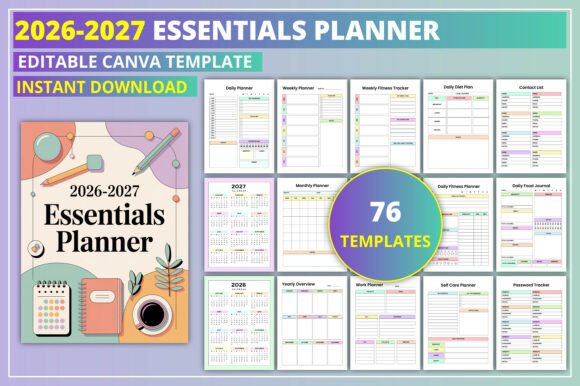
The planner spans 2026 and 2027 — two full calendar years — with monthly spreads from January to December for each year. You also get daily, weekly, and monthly planning pages, review sections, and a broad collection of specialty trackers and lists. Let's walk through what's inside and, more importantly, when and why you'd actually use each piece.
Yearly and Monthly Overviews: Seeing the Big Picture
The 2026 and 2027 calendars give you a bird's-eye view of each year. You can mark holidays, birthdays, project deadlines, or vacation windows all at once. The monthly pages for Jan–Dec in both years let you zoom in a bit closer. Use these for planning content calendars, mapping out product launches, or noting when your kids have spring break or finals week.
If you run a small business, these monthly spreads become your rough draft for the quarter ahead. You can block out campaign periods, product release dates, or seasonal promotions. Because everything is editable, you can highlight certain months with a specific color — maybe green for high-sales months, red for tight deadlines. That visual cue helps you prepare without having to dig through notes.
Daily and Weekly Planning Pages: Where the Real Work Happens
The daily planner pages are where most people will spend their time. Each day gives you room to list tasks, appointments, and priorities. The daily review section is a small but powerful addition — you can note what went well, what didn't, and what you'd do differently tomorrow. This turns a simple to-do list into a tool for continuous improvement.
The weekly planner and weekly review work the same way on a larger scale. Freelancers and entrepreneurs often find these pages especially useful. You can plan client work for the week, then use the review to track how many billable hours you actually logged. Over time, you start noticing patterns. Maybe Tuesdays are always your most productive day. Maybe you consistently overestimate how much you can do on Fridays. That awareness helps you plan more realistically.
Teachers and educators can use the weekly spreads to outline lesson plans, schedule grading blocks, and note parent-teacher conferences. Bloggers and content creators might map out posting schedules, social media content, and collaboration deadlines all in one place.
Monthly Planning and Review: Staying Aligned With Your Goals
The monthly planner pages let you zoom out a bit. You can set intentions for the month ahead, identify major milestones, and break down larger projects into weekly chunks. The monthly review is where you check your progress. Did you hit the revenue target you set? Did you actually exercise three times a week like you planned? These reviews keep you honest without being harsh — they're data points, not judgments.
For marketers and small business owners, the monthly review is a chance to look at campaign performance, customer feedback, and operational bottlenecks. You can note what marketing channels delivered the best ROI that month or which products sold out. That kind of real-world tracking helps you make smarter decisions next month.
The Yearly Overview: Planning Ahead Without Getting Overwhelmed
The yearly overview page gives you a single snapshot of both years. This is great for long-term planners. You can map out major life events, financial goals, sabbaticals, or multi-phase projects. If you're a freelancer, you might block out months when you plan to take on fewer clients and focus on personal development or travel. If you're a student or educator, you can see semester start and end dates, exam periods, and breaks all at once.
Sometimes just seeing the full picture reduces anxiety. You realize that the chaos of March is followed by a calmer April. The yearly overview helps you pace yourself.
Work Planner: Separating Professional From Personal
The dedicated work planner section is for those who need to keep business tasks distinct from home life. Use it to track projects, client deadlines, meeting notes, and professional development goals. If you're a manager or team lead, you can use these pages to prepare for one-on-ones, document employee feedback, or plan team initiatives.
Entrepreneurs often use the work planner to brainstorm new ideas, outline sales funnels, or track networking contacts. Because it's editable, you can rename sections to match your specific industry. A real estate agent might turn it into a client follow-up log. A graphic designer might use it to track revision rounds and project stages.
Shopping and Entertainment Trackers: The Fun Stuff
The shopping list and online shopping tracker are straightforward but surprisingly useful. You can separate grocery runs from online orders, which helps you avoid duplicate purchases and stay within budget. The movies to watch and TV shows to watch lists are perfect for anyone who always forgets what a friend recommended. Instead of scrolling through text messages, you have a dedicated place to log titles.
These lists also work well for content creators. A book blogger might track which movies or shows to review. A lifestyle influencer might log products to feature in future posts. It's a small habit that saves mental energy.
Self-Care and Wellness Sections: Practical Habit Tracking
The daily gratitude page is simple — write down one or two things you're grateful for each day. It takes thirty seconds, but over time it shifts your mindset. The self-care planner and self-care checklist help you be intentional about rest and recovery. You can schedule a bath, a walk, or an hour of reading just like you'd schedule a meeting.
The habits tracker and mood tracker are where you start seeing patterns. Maybe you notice that your mood dips on days you skip breakfast or that you're more productive when you exercise in the morning. The sleep tracker and water tracker reinforce basic health habits that are easy to neglect. If you share this planner with a client or use it yourself, these sections turn abstract wellness goals into daily actions.
The period tracker is a practical inclusion for anyone who menstruates. Tracking your cycle helps you anticipate energy levels, mood shifts, and physical symptoms. You can plan travel, presentations, or intense work days around your cycle when you understand your patterns.
The daily fitness planner and weekly fitness tracker let you schedule workouts and log what you actually did. You don't need to be an athlete. Even a 15-minute walk counts. The daily food journal, food diary, food list, daily diet plan, meal planner, and grocery list work together to simplify nutrition. You plan your meals, list ingredients, buy what you need, and then log what you actually ate. It's a closed loop that minimizes waste and impulse eating.
Budget and Household Management
The monthly budget and family budget pages are for tracking income, expenses, and savings goals. Freelancers and small business owners can use these to separate business and personal finances in a single planner. The daily cleaning and weekly cleaning schedule help distribute household chores so they don't pile up. The task checklist is a catch-all for anything that doesn't fit elsewhere.
The contact list and password tracker are practical additions that save you from digging through your phone or browser. You can store important numbers, email addresses, and login details in one place. Just be mindful about where you keep this planner if it contains sensitive information.
Who Benefits Most and What to Consider
This planner works well for anyone who juggles multiple roles — a parent who also runs an Etsy shop, a teacher who freelances on the side, a marketer who manages both client work and personal projects. The editing capability in Canva means you can remove sections you don't need and duplicate ones you do. You can change fonts to match your brand if you're selling it, or keep it simple if it's just for you.
Before you start, think about how you actually plan. Do you prefer daily breakdowns or weekly overviews? Do you want to track habits or just tasks? You don't have to use every page. The best approach is to customize it to your current season of life, then adjust as things change.
Also consider the format. Since it's editable in Canva, you can export it as a PDF to print or use digitally on a tablet with a stylus. If you plan to sell it as a KDP interior, make sure you review Amazon's formatting guidelines before uploading.
The Editable 2026-2027 Essentials Planner isn't a magic solution. It's a tool — one that adapts to whatever your life throws at you over two full years. And that adaptability is what makes it genuinely useful.